YouTube Tag Generator
Find the best tags for your video to rank higher. Reach more people using trending search terms. Boost your YouTube SEO for free now!
Most YouTubers pick tags by gut feeling. They type in a few obvious words, hit publish, and hope for the best. The problem? Tags chosen without strategy are basically invisible they don't help YouTube understand your video, and they don't help viewers find it.
That's where a YouTube tag generator changes the game. Instead of guessing, you get a list of relevant, search-backed tags in seconds. No keyword research degree required. Just better tags, faster.
Whether you've uploaded your first video or your five hundredth, this guide will show you exactly how tags work, why they still matter, and how to use a tag generator to get the most out of every upload.
What you'll learn in this post
What Are YouTube Tags — and Do They Still Matter?
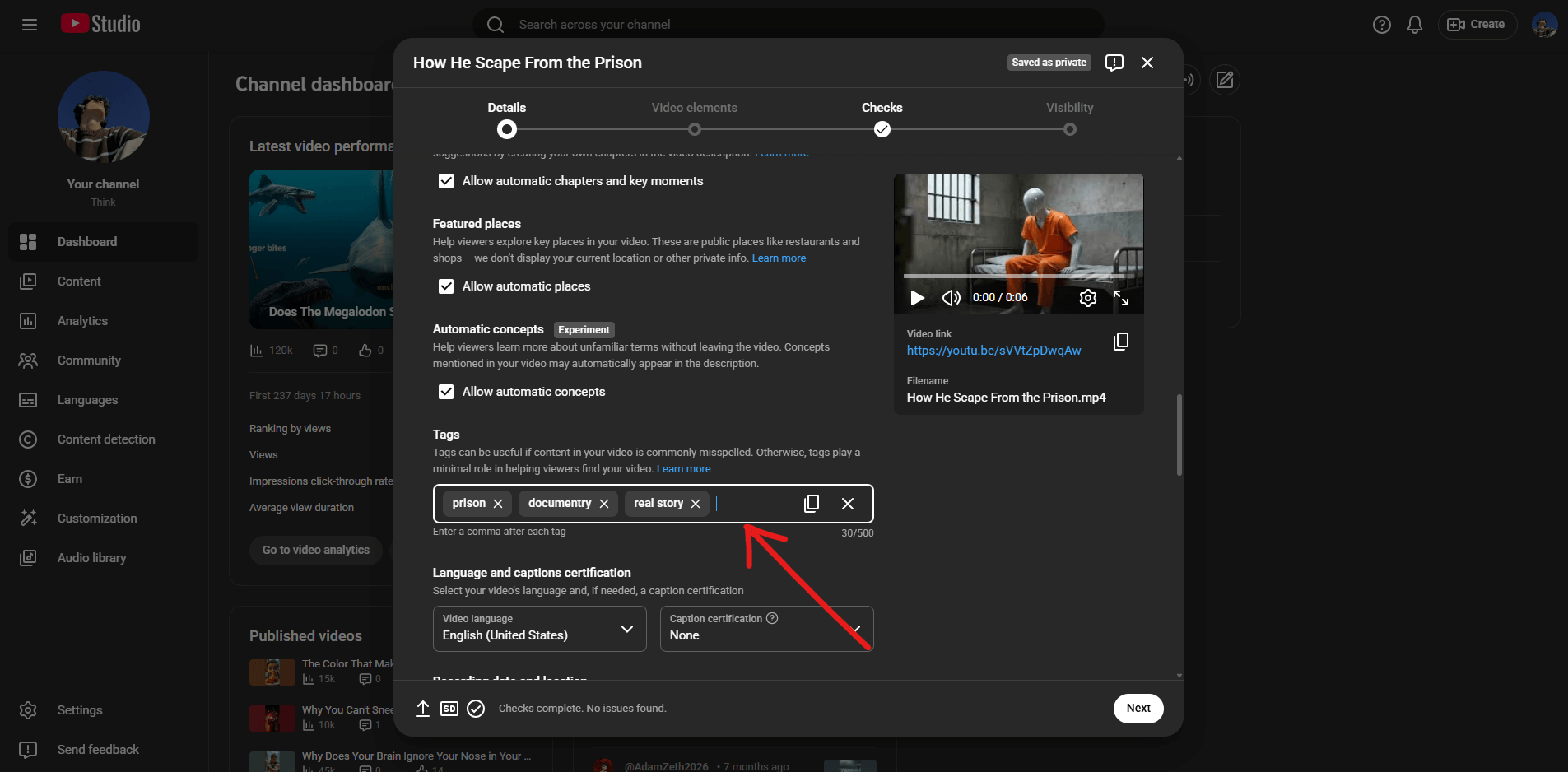
YouTube tags are descriptive keywords you add to a video when you upload it. They're not visible to viewers watching your video, but YouTube's algorithm reads them to understand what your content is about and decide when to recommend it.
Here's the honest answer to whether they still matter: yes, but not as much as they used to. YouTube has gotten smarter. Its algorithm now pulls signals from your video title, description, and even the spoken content in your video through automatic transcription. According to YouTube's own creator documentation, tags are now a "secondary signal" your title and description carry more weight.
But "secondary" doesn't mean "ignore it." Tags still help in a few important ways.
They help YouTube categorise borderline or niche content.
If your video sits at the intersection of two topics say, productivity and gaming the right tags help YouTube decide which audience to show it to.
They catch spelling variations and synonyms.
If someone searches for "how to edit vids on phone" and you've tagged your video with "phone video editing," that connection gets made.
They help in competitive niches.
The more tags you have that align with what's actually being searched, the more chances your video gets to show up. The key word there is align. Stuffing your tags with random popular keywords doesn't trick the algorithm it confuses it, and that hurts your reach.
How to Use a YouTube Tag Generator Step by Step
Getting great tags takes about two minutes once you know what you're doing. Here's the process:
Step 1: Enter Your Video Topic
Don't overthink this. Type in the main thing your video is about the same way someone would search for it on YouTube. "How to start a podcast," "beginner guitar lesson," "apartment living room makeover" whatever fits your video. The more specific you are here, the more targeted your tag results will be. "Sourdough bread recipe" will give you better, more relevant tags than just "bread."
Step 2: Review Your Tag Suggestions
A good tag generator will return a mix of short-tail tags (broad, high-volume) and long-tail tags (specific, lower competition). You want both. Think of it like building a house. Short-tail tags are your foundation broad terms that establish the general topic. Long-tail tags are the details specific phrases that help you show up for more precise searches. Aim to use 5–15 tags per video, mixing both types. YouTube allows up to 500 characters worth of tags, but more isn't always better. Relevance beats quantity every time.
Step 3: Add Your Brand or Channel Name
Always include your channel name as one of your tags. This helps YouTube connect your videos to each other and makes it more likely your own videos will appear in each other's "Up Next" suggestions. It's a small habit that compounds over time.
Step 4: Check What Competitors Are Using
Once you've got your core tags, it's worth seeing what similar videos rank on. Use our YouTube tag extractor to pull the tags from any public YouTube video. Paste in the URL of a top-ranking video in your niche and see exactly which tags they're using. You don't copy them wholesale you use them as inspiration to refine your own list.
Step 5: Paste and Publish
Copy your final tag list into the Tags field in YouTube Studio. Make sure there are no duplicates, the tags are all genuinely relevant to your video, and you haven't accidentally exceeded the 500-character limit.
Why a YouTube Tag Generator Beats Guessing Every Time
Let's say you've just uploaded a video about meal prepping for beginners. Off the top of your head, you might tag it with: meal prep, healthy eating, food, cooking, diet. Those aren't wrong. But they're also incredibly broad. Competing against millions of videos tagged "food" or "cooking" as a smaller channel is like opening a coffee shop on the same street as Starbucks and hoping people wander in.
A YouTube tag generator solves this by doing what you can't do manually in a reasonable amount of time: scanning what's actually being searched, what tags similar videos are using, and what niche, long-tail variations exist that have lower competition.
Long-tail tags are the ones that really move the needle for newer or smaller channels. Instead of just "meal prep," a tag generator might surface "meal prep for beginners with no time," "cheap meal prep ideas under £20," or "meal prep high protein low carb." Those phrases have real search intent behind them someone typing that exact thing is looking for exactly what you made.
The Right Mix: Short-Tail vs Long-Tail Tags
One of the biggest mistakes creators make is going all-in on short, generic tags. Here's why that backfires and what to do instead.
Examples like "fitness" or "cooking" get massive search volume, but competition is brutal. A brand-new channel ranking for "fitness" is basically impossible. That said, you still want 2–3 of them because they signal the broad topic of your content to YouTube's algorithm.
Phrases like "home workout for beginners no equipment" have lower search volume, but the people searching have very specific intent — and you're competing against far fewer videos. These are where smaller and mid-sized channels actually have a real shot at ranking.
A healthy tag list for a beginner home workout video:
home workout fitness at home beginner workouthome workout no equipment workout for beginners easy home fitness routinehome workout for beginners no gym 20 minute beginner workout at home[Your Channel Name]Tags vs Hashtags: What's the Difference?
A lot of creators confuse YouTube tags with YouTube hashtags. They're different things that serve different purposes.
Tags
Added in the video details during upload. Invisible to viewers. They help YouTube's algorithm categorise your content and match it to the right searches.
Hashtags
Appear in your video description or title, and they're clickable by viewers. When someone clicks a hashtag, they see a feed of all videos using that same hashtag. They're more of a discoverability feature for viewers than an algorithm signal.
Common YouTube Tagging Mistakes (and How to Avoid Them)
Even experienced creators make these — worth knowing before you hit publish.
Using irrelevant tags to chase views
Tagging a cooking video with trending gaming keywords might seem like a shortcut to more eyeballs. YouTube's algorithm sees through this immediately, and it can actually suppress your video's reach. Stick to what your video is genuinely about.
Repeating the same tag with slight variations
Using "home workout," "home workouts," and "home workout video" as three separate tags wastes your character limit. YouTube treats these as essentially the same signal. Pick one version.
Ignoring long-tail tags entirely
If every tag you use is a single word, you're leaving discoverability on the table. Long-tail tags are where smaller channels win.
Forgetting to update tags on older videos
If a video isn't getting traction, its tags might be part of the problem. Go back to YouTube Studio, run the topic through the tag generator again, and update the tags. Some creators have seen significant view increases just from refreshing old tags.
Not researching before tagging
Tags you guess at in 30 seconds are rarely as effective as tags informed by actual search data. That's the entire point of using a generator.
How to Check Your Video's Performance After Tagging
Tags alone won't make a bad video perform well but the right tags on a good video can make a real difference in how quickly it gets discovered. Once you've published, keep an eye on a few things.
YouTube Studio's Traffic source: YouTube search report shows you which search terms are actually sending viewers to your video. If terms you tagged are showing up there, your tags are working. If you're getting search traffic from terms you didn't tag add those terms to the tags on that video right away.
You can also use our YouTube video stats tool to get a quick snapshot of how any video is performing, and our YouTube trends search to spot rising topics in your niche before you create your next video.
A Quick Note on YouTube's Tag Character Limit
YouTube gives you 500 characters for tags across your entire video. That sounds like a lot until you start adding long phrases.
A practical approach: prioritise quality over quantity. Ten highly relevant tags will outperform thirty vague ones. Don't pad your list just to fill the 500-character limit every tag you add should earn its place by being genuinely relevant to your video's topic, title, or target audience.
If you're not sure whether a tag fits, ask yourself: "If someone searched for this exact phrase on YouTube, would they be happy landing on my video?" If the answer is no, drop it.
Frequently Asked Questions
More Free YouTube Creator Tools
YouTube Title Generator
Generate click-worthy titles to pair with your tags and the title is the most important discoverability signal, tags support it.
Try ToolVideo Description Generator
Write an SEO-optimised description that works alongside your tags to give the algorithm a full picture of your video.
Try ToolYouTube Trends Search
See what topics are gaining traction right now so you're generating tags for content people actually want to watch more.
Try ToolYouTube Tag Extractor
Pull the exact tags from any YouTube video paste in a competitor's URL and use their tag strategy as a research starting point.
Try ToolYouTube Hashtag Generator
Generate hashtags to add to your video description a separate but complementary layer on top of your tags.
Try ToolThumbnail Downloader
Download thumbnails from top videos in your niche pair visual research with tag research for a complete picture of what's working.
Try ToolGrow Your Channel with Premium Tools
Unlock AI-powered similar thumbnail search, outlier finder, content generator, and more. Everything you need to rank higher, get more clicks, and build an audience that sticks.